How to Make a Circle in Minecraft
Circles are everywhere in great Minecraft builds — towers, arenas, fountains, and castle walls all start with one. The problem? Minecraft's world is made of square blocks, so building a round shape requires a reliable method. This Minecraft circle guide walks you through how to make a circle in Minecraft step by step, from small 5-block rings to massive 100+ diameter builds.
Why Circles Are Tricky in Minecraft
Every block in Minecraft sits on a 1-meter cube grid — no curves, no half-blocks, just squares. When you want to build a circle in Minecraft, you're placing a pattern of blocks that looks round from a normal distance, even though every piece is perfectly square.
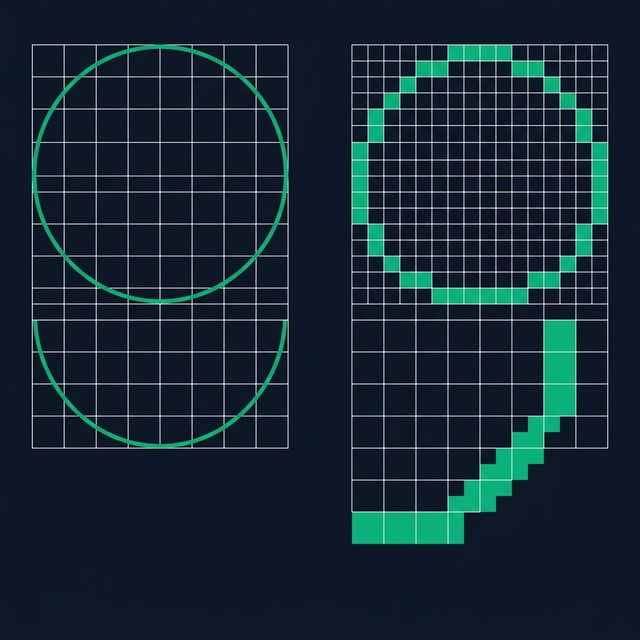
Getting the pattern right is the real challenge. On a small Minecraft circle (under 10 blocks across), one wrong block is immediately obvious. On a large circle (50+ blocks), tracking hundreds of positions by hand quickly becomes tedious.
That's why most experienced Minecraft builders rely on two things:
- Circle reference charts — pre-made pixel grids for common sizes (browse our Minecraft circle chart for every size from 3 to 256)
- Circle tools — interactive apps like our Minecraft circle generator that compute the perfect pattern in real time
Both approaches use the same math under the hood — Bresenham's midpoint circle algorithm — which finds the best block placement for any radius. You don't need to know the formula; the tools handle it. But understanding that there is a proven algorithm explains why tool-generated Minecraft circles always beat freehand attempts.
Step-by-Step Guide to Building a Circle in Minecraft
Here's the proven method that professional Minecraft builders use to make circles in Minecraft. Whether you want to build circle Minecraft structures in Survival or Creative, this approach works for any size in both Java and Bedrock editions.
Choose Your Minecraft Circle Size
Decide the diameter (total width in blocks) of your Minecraft circle. Common sizes:
- Small (5-15 blocks): Fountains, well rims, towers
- Medium (15-40 blocks): Arenas, circular rooms, garden borders
- Large (40-100+ blocks): Stadiums, castle walls, pixel art
For your first Minecraft circle, we recommend starting with a 15-block diameter — big enough to look good, small enough to build quickly.
Get a Reference Pattern
Open our Minecraft circle tool and enter your chosen diameter. It instantly shows you exactly which blocks to place. You can:
- View the Minecraft circle pattern on screen as you build
- Download it as a PNG image for offline reference
- Check the exact block count (and how many stacks you need)
Alternatively, scroll down to the size reference table or visit the full Minecraft circle chart for all sizes.
Build Your Minecraft Circle by Quadrant
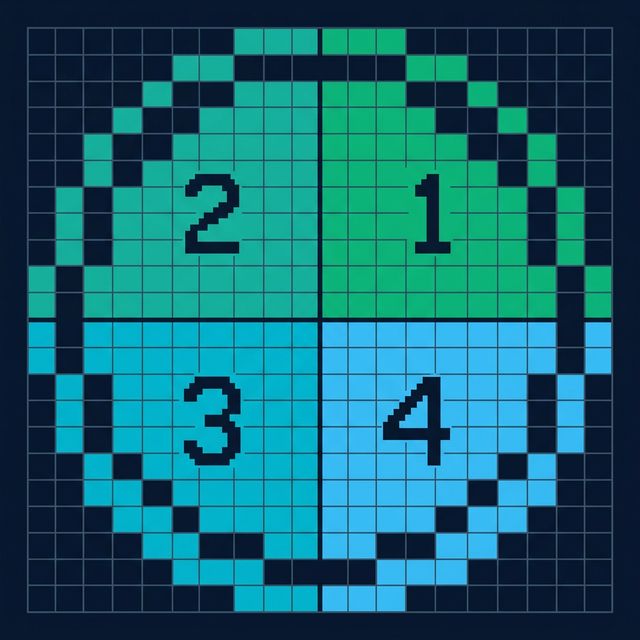
The quadrant method is the fastest way to build an accurate circle in Minecraft:
- Place a marker block at the center of your build area
- Count outward to establish the radius in each direction (N, S, E, W)
- Build one quadrant (top-right quarter) by following the reference pattern row by row
- Mirror the same pattern to the other three quadrants
Verify Your Minecraft Circle
After placing all blocks, step back and check your Minecraft circle from above (press F5 or fly up in Creative mode). Look for:
- Symmetry: Each quadrant should be a mirror image of the others
- Smooth curves: No jagged bumps that break the visual flow
- Block count: Compare with the reference tool to make sure nothing is missing
If you spot any issues, the fix is usually just adding or removing 1-2 blocks at the transition points where the curve changes direction.
Try It: Minecraft Circle Preview
Use this interactive preview to see what any Minecraft circle looks like before you start building. Drag the slider to change the diameter and watch the block pattern update.
Common Minecraft Circle Sizes
Here are the most popular Minecraft circle sizes builders reach for, along with block counts and typical use cases. For a full visual reference covering every diameter from 3 to 256, check the Minecraft circle chart.
| Diameter | Grid Size | Blocks (Outline) | Stacks (×64) | Best For |
|---|---|---|---|---|
| 5 | 5×5 | 12 | 0.2 | Well rims, pillars |
| 7 | 7×7 | 20 | 0.3 | Well rims, pillars |
| 9 | 9×9 | 28 | 0.4 | Well rims, pillars |
| 11 | 11×11 | 36 | 0.6 | Fountains, towers |
| 15 | 15×15 | 44 | 0.7 | Fountains, towers |
| 21 | 21×21 | 64 | 1.0 | Arenas, gardens |
| 31 | 31×31 | 96 | 1.5 | Arenas, gardens |
| 41 | 41×41 | 128 | 2.0 | Stadiums, walls |
| 51 | 51×51 | 160 | 2.5 | Stadiums, walls |
| 65 | 65×65 | 200 | 3.1 | Mega builds, pixel art |
| 81 | 81×81 | 252 | 3.9 | Mega builds, pixel art |
| 101 | 101×101 | 316 | 4.9 | Mega builds, pixel art |
Need exact block counts for any Minecraft circle size? → View Full Minecraft Circle Chart
Pro Tips for Large Minecraft Circles
Small Minecraft circles (under 30 blocks) are straightforward, but larger builds need a smarter workflow. This circle guide Minecraft section shares how experienced players handle big circles efficiently:

Use a Second Screen
Keep the generator open on a phone, tablet, or second monitor so you can glance at the pattern without leaving the game.

Count Rows, Not Blocks
Instead of tracking individual block positions, count how many blocks go in each row. Our tool's ruler overlay makes this easy even on 100+ diameter circles.
Mark the Compass Points
Place temporary dirt or scaffolding at north, south, east, and west. These anchors keep you oriented while you fill in the curves between them.
Prototype in Creative
Test your circle in Creative mode first to nail the size and proportions before spending resources in Survival. Save the coordinates for later.
Minecraft Circle FAQ
How do you make a circle in Minecraft?
Choose a diameter — 15 blocks is ideal for your first Minecraft circle. Mark the center of your build area, then follow a reference pattern to place blocks along the outline. The fastest method to make circle Minecraft builds is the quadrant approach: build one quarter of the circle, then mirror it to the other three sides for perfect symmetry every time.
What is the easiest Minecraft circle size to build?
Small, odd-numbered diameters like 5×5, 7×7, or 9×9 are the easiest to build in Minecraft. A 7-block circle only takes 20 blocks total, and the pattern is simple enough to memorize. Once you're comfortable at that scale, moving up to a 15 or 21 block Minecraft circle feels very natural.
Can you make a perfect circle in Minecraft?
Since Minecraft uses a square block grid, true curves aren't possible — every circle is a stepped approximation. That said, a Minecraft circle with a diameter of 25 blocks or more looks convincingly smooth from normal viewing distance. Using a reference tool or chart ensures you get the best possible result at any size.
How many blocks do I need for a Minecraft circle?
It depends on the diameter and whether you want hollow or filled. A hollow 15-block Minecraft circle takes about 44 blocks (less than one stack), while a filled version needs around 177. Check our Minecraft circle chart for exact block counts at every size from 3 up to 256.
What's the best tool for building circles in Minecraft?
A Minecraft circle guide or online tool is the quickest way — enter a radius, pick hollow or filled, and you get a pixel-perfect reference grid instantly. You can download the pattern as PNG or view it on a second screen while you build. For in-game automation, WorldEdit's //hcyl command works but requires mod installation.
How do I build a large Minecraft circle without mods?
Open an online Minecraft circle tool on a second screen (phone, tablet, or second monitor) and build one quadrant at a time, counting row by row. For really large circles (50+ diameter), use the ruler overlay to keep track of your position. It takes patience, but the result is a clean, symmetrical circle every time.
Related Minecraft Circle Building Tools
Minecraft Circle Generator
Set any radius, pick hollow or filled, adjust line thickness, and download the result as PNG.
Minecraft Circle Chart
Visual block-count reference for every Minecraft circle diameter from 3 to 256.
Pixel Circle Generator
Build pixel-perfect circles for sprite art, cross-stitch patterns, and retro game assets.